
In a world obsessed with glossy filters and over-engineered visuals, true cultural shifts happen when someone dares to strip it all away. Enter the Brat Text Generator—your ultimate gateway to the internet’s favorite raw, high-contrast, and unapologetically bold design movement. Inspired by the seismic cultural impact of Charli XCX’s iconic era, this tool effortlessly translates ordinary words into striking visual statements, requiring absolutely zero graphic design experience.
The traditional internet favored complex graphics, but today’s digital landscape belongs to fierce authenticity and low-fidelity rebellion. Featuring low-resolution lowercase typography slammed against an electrifying, acidic lime green canvas, this aesthetic isn’t just a font choice; it’s a mood, an attitude, and a cultural shorthand for self-expression.
Whether you are looking to craft the next viral Twitter meme, inject your personal branding with a hit of modern pop culture, or design striking graphics that instantly disrupt a crowded social media feed, our completely free online generator handles the heavy lifting instantly. No paywalls, no tedious registration forms, and no complex software—just pure, unfiltered creative freedom at your fingertips.
What is the Brat Aesthetic and Why is it Viral?
Before diving into the technical mechanics of an interactive online utility, it is vital to understand the psychological and aesthetic principles driving the trend. Unlike traditional design trends that favor crisp geometric symmetry, pixel-perfect layouts, and muted pastel palettes, the brat style thrives on intentional imperfection.
The core characteristics include:
- The Signature Green: A specific, somewhat abrasive shade of chartreuse or lime green (Hex code
#8ace00). - The Font Choice: A standard, unpretentious sans-serif font—most notably clean, unadorned Arial.
- The Low-Fi Texture: A subtle blur or low-resolution compression artifact that makes the text look like a screenshot of a screenshot.
- The Framing: Lowercase, often off-center placement that feels casual, raw, and authentic.
Because this look is so distinctly minimal yet instantly recognizable, it has become the ultimate blueprint for user-generated content. Anyone with a basic text input field can participate in the conversation. By utilizing a dedicated brat text generator to output authentic brat text, creators can instantly signal that they are in sync with contemporary internet culture.
Anatomy of a High-Converting Brat Text Generator
From a functional and web development perspective, a robust brat text generator needs to balance simplicity with behind-the-scenes power. If you are configuring a custom application on your domain, your utility tool should ideally provide an interactive sandbox environment where users can tweak settings on the fly.
1. The Power of Micro-Adjustments
While the default aesthetic seems simple, the magic lies in the fine-tuning. A high-quality tool requires interactive controls that allow users to manage the spacing and texture of their typography. This includes:
- Letter Kerning: Tightening or expanding the horizontal distance between characters to mimic tight album text layouts.
- Low-Res Blur Filters: A slider that dynamically injects a web-safe CSS blur effect, turning crisp vector typography into a beautifully nostalgic, low-fi meme asset.
- Content Padding: Adjusting the inner boundaries so that the text wraps naturally, keeping it perfectly balanced regardless of the viewport dimensions.
- Manual Font Size Scaling: Ensuring that short phrases or longer, multi-line blocks fit within the designated aspect ratio.
2. Export Flexibility and Performance
When users finish customizing their statements, they need immediate, uncompressed access to their creations. A premium application must support several export pipelines:
- High-Resolution Rendering: Generating high-scale outputs so the text remains clean even when stretched across different devices.
- Instant Clipboard Integration: Allowing users to copy the generated graphic directly to their device’s clipboard for instant pasting into chat apps or social drafts.
- Diverse Format Support: Providing direct download hooks for both lossy layouts and alpha-channel transparencies.
Going Beyond the Green: Diverse Aesthetic Variations
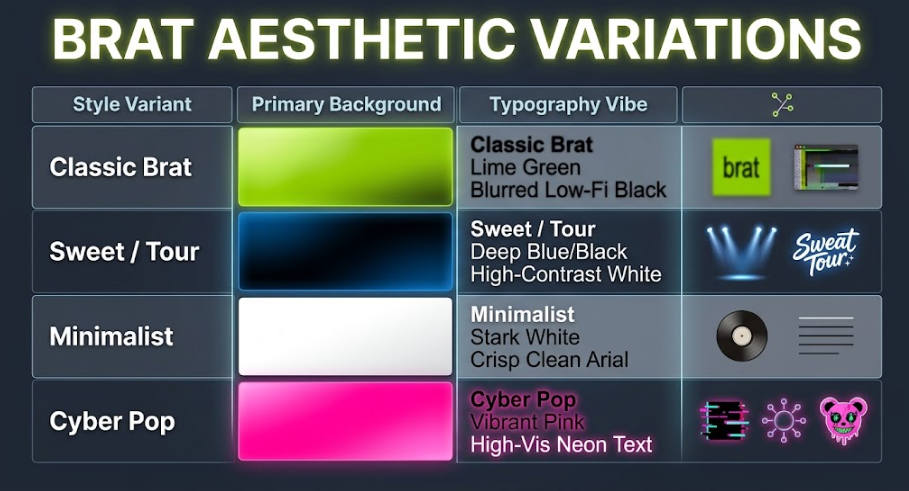
While the classic chartreuse green dominates the conversation, the trend has evolved into several distinct sub-genres. A truly versatile creator or tool developer knows that limiting your visual palette to a single color scheme means missing out on broader cross-over trends.
The Elegance of Contrast: Brat Text Generator White
For a cleaner, more editorial approach to the trend, many creators are stripping away the high-visibility neon green in favor of a stark, minimal backdrop. Utilizing a brat text generator white preset swaps out the chartreuse for a brilliant, clean white surface while keeping the tight letter spacing and low-fi blur of the text. This specific variation draws heavy inspiration from classic minimalist vinyl sleeves and indie rock imagery, making it an excellent alternative for brands that want to participate in the trend without clashing with their existing neutral color palettes.
The Dark Mode Alternative: Brat Text Generator Black
Conversely, turning the lights down completely offers a moody, night-club-inspired aesthetic. A brat text generator black configuration places high-contrast white or neon text over a deep black background. This alternative layout mimics premium event flyers, underground concert promotion material, and the highly popular “Sweat Tour” branding. It’s an essential style for late-night content creators, music bloggers, and platforms looking for a dramatic, high-impact presentation that stands out in a sea of bright social media feeds.
The Bold and Flashy: Brat Text Generator Pink
As internet culture fragments into various subcultures, the trend has inevitably collided with classic cyber-pop and hyper-pop visual spaces. By switching to a brat text generator pink setting, you inject a shocking, high-saturation neon pink background behind your statements. This vibrant variation is incredibly popular among lifestyle influencers, beauty brands, and pop-culture commentators who want to blend the attitude of the brat trend with a playful, high-energy color palette.
Advanced Content Creation Pipelines
To maximize the impact of your generated assets, you need to think about how they integrate into broader multimedia editing suites. Static text is great for basic posts, but moving images and video are where the true viral reach lies.
Layering Graphics: Brat Text Generator on Photo
One of the most effective ways to use this style for editorial or commercial content is to overlay the typography directly over real-world imagery. Using a brat text generator on photo workflow allows you to upload custom background images—such as candid snapshots, street photography, or product shots—and position the iconic text style right on top. Whether you configure your text box as a split-screen layout or set it as a floating, semi-transparent layer, blending real photography with this specific typography creates a compelling, professional-grade marketing asset.
Transparent Overlays: Brat Text Generator PNG
If you prefer to handle your compositing inside professional desktop design programs or mobile apps like Canva, exporting your text with a flat color background can slow you down. This is where a brat text generator PNG feature becomes incredibly valuable. By rendering the text with a fully transparent alpha channel background, you can download the raw typography asset directly. This allows you to effortlessly overlay the exact font weight, kerning, and blur settings onto any complex canvas, video layer, or multi-platform website element without dealing with messy color keying.
Video Optimization: Brat Text Generator CapCut
The ultimate destination for modern viral trends is short-form video. TikTok and Instagram Reels thrive on quick-cut transitions and dynamic text overlays. Creators frequently export their transparent graphic files and drop them directly into mobile editing suites. Setting up a brat text generator capcut workflow means using your custom-generated text blocks as high-quality graphic asset overlays within your video timelines. You can apply keyframe animations, slide transitions, or glitch effects to the text, matching the beat of your background music and driving massive engagement numbers on mobile feeds.
Designing a Premium, High-Quality User Experience
If you are a web developer or a business looking to deploy a utility tool on your site, focus on providing a brat text generator high-quality output. A low-quality tool relies on low-resolution image stretching, resulting in blurry, pixelated edges when users try to save their work.
To ensure a premium user experience, your application should utilize robust JavaScript libraries like html2canvas or native HTML5 Canvas elements to render the workspace at two or three times the standard display resolution (scale: 3). This ensures that even though the artistic style calls for an intentional low-fi blur, the underlying file container remains sharp, professional, and optimized for high-density smartphone screens and large desktop displays alike.
Furthermore, integrating a brat text generator video preview function or an animated layout toggle can set your platform apart. Allowing users to preview how their text looks across different aspect ratios—like a 16:9 widescreen canvas, a 1:1 square post, or a 9:16 vertical story—ensures they can build their content perfectly on the first try.
Local SEO and On-Page Optimization Strategies for Utility Tools
If your goal is to launch your own single-page utility tool or host a generator application to capture massive search engine traffic, implementing a tight, disciplined SEO framework is essential.
1. Intent-Based Keyword Mapping
When users search for creative tools, their intent is highly transactional and immediate. They aren’t looking for long histories of graphic design; they want a tool that solves their problem in under ten seconds. Structure your landing page so the interactive workspace card sits directly above the fold. Place your headings logically to target your core phrases naturally:
- Use
<h1>tags for broad terms like “The Ultimate Interactive Brat Generator Workspace”. - Deploy
<h2>and<h3>tags to capture secondary, high-value search terms like “Exporting Custom Graphics” or “Setting Up Custom Presets with Alternative Visual Layouts”.
2. Strategic Internal Backlinking
For site owners who manage multiple web domains—such as a creative design agency site, a personal portfolio, or a high-traffic niche blog—proper internal and external backlinking structures are vital. Link your informational blog posts directly to your interactive tool pages using descriptive, keyword-rich anchor texts.
For instance, if you write a comprehensive article analyzing modern marketing trends, you should naturally embed a link like: “If you want to create your own viral social graphics instantly, try using our free brat text generator to design custom layouts in real-time.” This contextual linking tells search engine crawlers exactly what your utility tool does, passing authority smoothly across your domain architecture and raising your search visibility.
Conclusion: Capitalizing on High-Velocity Digital Trends
The enduring appeal of the brat aesthetic lies in its accessibility, its counter-cultural attitude, and its brilliant simplicity. It proves that you do not need an army of corporate graphic designers or a massive budget to create a visual identity that captures the imagination of millions worldwide. All you need is a clear statement, a bold vision, and the right digital tools.
By understanding the mechanics behind a premium brat text generator—from precision font kerning and adjustable blur scales to flexible transparent asset exports—you can seamlessly integrate this iconic look into your personal brand, client portfolios, or video production workflows. Stay experimental, fine-tune your layouts, and don’t be afraid to make your digital presence a little more vibrant.